









Asus TUF Gaming A14 (2026) gaming laptop review

The Asus TUF Gaming A14 has been one of the best budget gaming laptops of the last few years. The A14 is not only lighter and easier to use, but it is also significantly better in terms of performance and battery life.
And, while the TUF Gaming A14 has historically been a great deal, offering incredible performance for the price, this has unfortunately been changed due to the current memory shortage. This year’s A14 is significantly more expensive than its predecessors, making it less attractive as a student laptop.
Asus has offset some of the increased hardware costs by changing the A14 formula. Instead of pairing an Nvidia discrete GPU with an AMD APU, Asus used AMD’s powerful Ryzen AI Max+ chipset with the powerful Radeon 8060S integrated graphics. Asus started playing with Ryzen AI Max+ chips in gaming laptops last year, but the A14 is its first big gamble in creating a gaming laptop with fully integrated graphics.
Design and Features
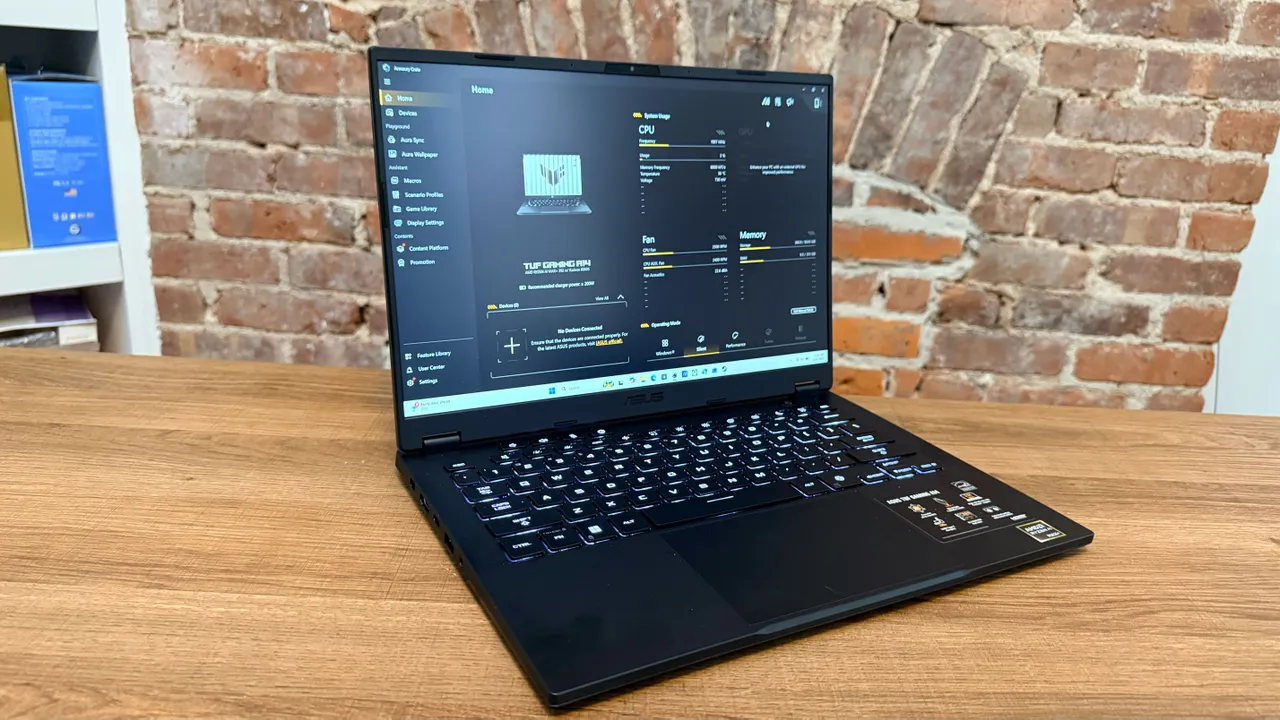
The TUF Gaming A14’s chassis is largely a case of “if it ain’t broke, don’t fix it.” The chassis has remained practically the same throughout the A14’s entire life cycle over the years, with the same small hinge bump, the same keyboard, and the same display panel. As gaming laptops go, the A14 is one of Asus’s more budget-friendly designs with a stripped-down aesthetic.
The most immediate aspect of the A14’s design is its lightweight construction. Weighing just over 3 pounds, the A14 doesn’t feel like a gaming laptop. It is relatively thin, extremely light and easy to carry. This makes it perfect for college students who need a powerful laptop for STEM or creative workloads, but still need to take that laptop to class. And with MIL-STD-810H certification, the A14 should be as durable as it is light.
Unlike some of the flashier laptops Asus introduces every year, the TUF Gaming A14 is a sleek gray gaming laptop with minimal keyboard lighting and no external RGB lightbar, making it great for students and professionals. The top cover lid and bottom panel are made of lightweight aluminum while the chassis and the sides of the keyboard deck are made of soft-touch plastic.

The A14’s keyboard is also similar to the previous model, with large keys, ample keyspacing, and a satisfying click actuation. The mechanical touchpad has a sizable footprint for a smooth feel and precise precision.
The display is the same 14-inch, 16:10, 2,560 x 1,600, 165Hz panel that has been used in previous versions of the laptop. It’s not the most stunning display, but the A14’s matte panel has crisp colors, intense blacks, and enough brightness (just under 400 nits) to drown out any indoor glare. The A14 is rated for 100% coverage over the sRGB color gamut, so it’s ideal for gaming or video streaming, but may not be the most accurate for intense color grading.
However, all versions of the TUF Gaming A14 have been sleek and durable with satisfactory keyboards, bright crisp displays, and ample ports for all your accessories. The surprise this year is that the A14 is no lighter, despite the removal of the discrete GPU. This shows how well the design of the A14 has been optimized.
In terms of ports, the TUF A14 has two USB-C ports, two USB-A ports, an HDMI 2.1 hook-up, and an audio jack on the right and left sides of the chassis. If you want a more permanent setup, that’s more than enough connection options to set up the A14 as a full-fledged game station with a monitor and mouse. And none of them are in a tricky location, so you won’t need to look for the right port on the back of the laptop.
The audio system on the A14 is probably its weakest design feature. With a dual-speaker system with Dolby Atmos tuning, the audio is powerful, but the rear-facing speaker design means the audio can be a little muddled. This is especially true when the fans kick on during a gaming session. For any intensive gaming it’s better to connect a solid pair of studio headphones rather than rely on the built-in speaker system.
The budget is not that budget anymore
Priced at $2,199, the 2026 TUF A14 is priced significantly lower than the 2024 TUF A14’s starting price of $1,399. The 2025 model was a little more expensive at $1,699 but still felt affordable. $2,199 isn’t that bad compared to many current-generation gaming laptops, but it’s almost $1,000 too expensive to be considered “budget” anything. The 2026 A14 is still slim, powerful, and light but it’s far from economical.
Software and Features – Arsenal Crate
The Asus Armory Crate has bloated a bit over the years, especially after the launch of the Asus ROG Alley, which required additional features like a game library management tool. Unfortunately, on a gaming laptop, this makes the Armory Crate heavier than it should be for software that’s mostly useful for adjusting power profiles and controlling RGB lighting.
Asus also recently added an AI image generation tool to Armory Crate inside the Aura Wallpaper Manager, which makes the software more bloated and sluggish in responding. It’s a somewhat useful tool for customizing your laptop wallpaper, but other image generators or wallpaper aggregators will provide you with better designs without all the extra software bloat. Thankfully, you don’t need to download all the resources for the AI image generator, and it’s probably best to just pretend it doesn’t exist.
Landscape Profile, Macros, and Display Settings are the most useful tabs in Armory Crate. However, you can handle most thermal and lighting management features from the home screen, which is a major advantage of Armory Crate compared to some other laptop management tools like Razer Synapse or Lenovo Legion Space.
Display
2,560 x 1,600 (16:10), IPS
processor
AMD Ryzen AI Max+392
connectivity
WiFi 6E, Bluetooth 5.3
ports
1x Type-C USB 4 (40Gbps), 1x USB 3.2 Gen 2 Type-C (10Gbps), 2x USB 3.2 Gen 2 Type-A (10Gbps), 1x HDMI 2.1 FRL, 1x Card Reader, 1x Audio Combo Jack
audio
2 speaker dolby atmos system
webcam
1080p FR Webcam for Windows Hello
Performance and Gaming
In terms of general performance and content creation workflow, there’s not much you can do to the TUF Gaming A14 that it can’t handle. It may not be the most expensive hardware on the market, but the A14 has enough raw power to compete with more robust hardware. The A14’s Ryzen AI Max+ 392 APU is, after all, a beast of a 12-core, 24-thread APU.
Unfortunately, Asus loads the TUF Gaming A14 with 32GB of RAM. This is absolutely average for a gaming laptop, if not slightly higher than the RAM found in budget systems. But, because the Radeon 8060S is an integrated GPU, it needs to share system memory with the processor, something a discrete graphics chip like the RTX 4070 doesn’t need to do. After all, this is one reason why the Ryzen AI Max+ 392 supports up to 128GB of memory.
This is why the A14 doesn’t come close to the RTX 4070 mobile performance like some other iterations of the Ryzen AI Max+ APU. Because, with a total of 32GB of RAM, the 8060S has less memory to play with, while the RTX 4070 has 8GB of fast VRAM that doesn’t need to be shared.
Still, you get solid gaming performance that can handle modern titles at 1080p or 1600p at medium to high settings, depending on the game. In Baldur’s Gate 3, the A14 can easily jack the settings up to 1600p Ultra without any issues, and Final Fantasy XIV: Dawntrail runs smoothly at 1600p High (laptop). But Monster Hunter Wilds runs best at 1080p medium.
In my testing, Assassin’s Creed Shadows runs at 60fps at 1080p Ultra High if you enable 2x frame generation, but the A14 FSR struggles to go beyond 30fps without frame-generation. Meanwhile, games like Cyberpunk 2077 and Metro Exodus: Enhanced Edition can’t even reach 30fps at the highest settings at 1080p. Playing any game at a lower graphics preset gives you better performance, but you’re missing out on those bright ray-traced reflections and lighting.
If you want to play your games at the highest possible settings, a gaming laptop with a discrete GPU like the Alienware Aurora 16X or Razer Blade 16 will give you better performance, but especially in more graphics-intensive games like Metro Exodus. Even though the A14’s Radeon 8060S is a powerful integrated GPU, it doesn’t have the raw horsepower of a discrete RTX 50-series GPU. This is slightly more comparable to the RTX 4050 or RTX 4060, so the Aurora 16X’s RTX 5070 and the Razer Blade 16’s RTX 5090 will always outperform the A14.
However, if you’re a more casual gamer, or you’re willing to give up your graphics settings and resolution in favor of a lighter, thinner laptop, the A14 is powerful enough for some comfortable game sessions.
battery life
The TUF Gaming A14 has always been a gaming laptop with solid battery life. And despite the specific changes Asus has made this year, the A14 can still achieve solid longevity on a single charge.
The A14 easily survives a full 8-hour work day with my standard workload of multiple browser tabs, photo editing software, and a few background apps like Spotify and Discord. On the UL Procyon battery life benchmark, the A14 averaged more than 9 hours of battery life, with the longest battery life reaching 11 hours and 34 minutes.
However, as you might expect from a powerful x86 laptop, battery life dropped off drastically while gaming. I got about 2 hours out of Baldur’s Gate III In That’s before the battery drops to critical levels, which isn’t bad. That’s a bit below gaming handhelds, but the A14 is a far more powerful device than your average handheld gaming PC, so that’s to be expected.
Madeline (she/her) is a contributing writer at IGN. She has been writing about comics, technology, and gaming since 2013. His bylines have appeared on sites such as Laptop Mag, PCMag, TechRadar, Tom’s Guide, CGMagazine, and Bleeding Cool.